
Last Updated on October 9, 2023 by KnownSense
In automation design principle page, you can read about the importance of an automated deployment pipeline, and in this Page, we’ll focus on the automation tools and the patterns that are involved as part of this pipeline.
So you know when we make code changes to our microservices, we want to save these changes to a central database, a source control system. Then we want an automated build tool which basically takes those changes and builds our software and runs a number of tests to see if everything is okay. Then we have an automated deployment tool in our pipeline which takes successful builds where the build has been successful and the tests have passed and then it deploys our build to a specific environment. The good news is there are many tools out there that are available that work together like this in order to form an automated deployment pipeline and they fall under three main categories discussed below
1. Source Control Systems

Source control systems basically follow the central code repository pattern, which means you have a central database where you store all the code for your microservices, and as your developers make code changes, they save those changes to the central code repository and this code repository also keeps a history of all changes. Like many tools these days, you’ll find there are many that work on‑premise or you can install on your servers and there are many that are available online, i.e. work in the cloud. As part of storing your code, using a central code repository, another strategy you’ll have to choose is a branching strategy that can affect how your deployment pipeline actually works. Branching strategies are all about how you organize your code changes and how you organize versions of your code which are available for release and how you merge changes between these versions of the code, and the good news is there are many reputable source control systems out there which provide all this functionality.
2. Continuous Integration Tools
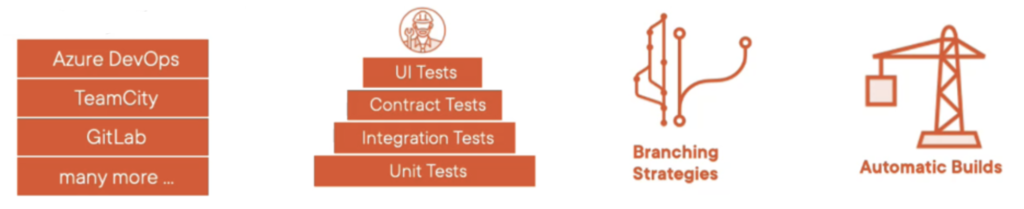
The next tool in the pipeline is our build server that does automatic builds of our code and this falls under the category of a continuous integration tool. So as well as having the ability to detect changes in our source control system to do automatic builds to see if our changes compile, our continuous integration tools also need the ability to support branching strategies so that we can build different versions of our code from our source control system. So you can see as part of our deployment pipeline, our continuous integration tool, it needs to have quite a bit of synergy with our source control system in order to get this working. In addition to doing automatic builds for the different branches in our source control system, our continuous integration tools also need the ability to run a layer of automated tests for each one of our builds, and these automated tests will automatically ensure that the changes we’ve made to our microservices are valid and that our microservices integrate correctly back with our overall microservices architecture. Again, the good news is there is a range of continuous integration tools available that provide all this functionality and provide a means of giving quick feedback on failed build or failed tests.
3. Continuous Delivery Tools
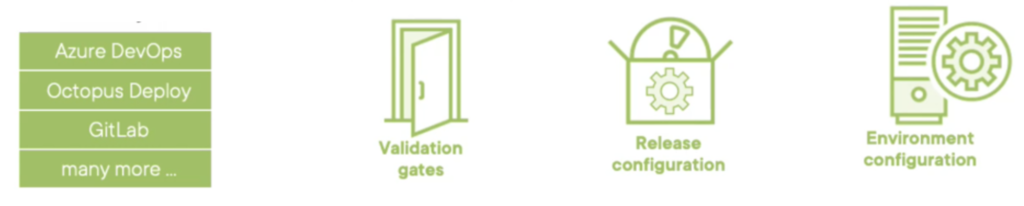
The final tool within our automated deployment pipeline falls under the category of continuous delivery and these tools that these deployment servers normally gives the ability to store different environment configurations so that we can deploy different microservices to different environments. I can basically have different sets of configuration that describe all the parameters associated with, for example, the development environment, the test environment, the preproduction environment, and the final production environment. So along with having information of where we’re going to deploy our microservices to, our deployment servers also contain information about release configuration. So these are basically all the parameters, all the bits of information associated with the specific version of our microservice that we’re going to release. So for example, for one of our microservices, release configuration could include not only the version number of that microservice, but also for example, the temporary directory that the microservice can use from the local server to do some kind of local data processing. The other cool feature that most continuous delivery tool to provide is the idea of validation gates, which basically means don’t deploy this version of our microservice to production unless it’s already been deployed to development, test, and preproduction, and it’s been signed off at each stage by the relevant manager. Again, the great news is there are a number of tools available under the continuous delivery category that provide all this functionality, and as you can see from the names, there are some tools that provide the entire automated deployment pipeline from end to end.
Road to DevOps
Semi-Automated

The key thing to remember here is not only do you need tools and patterns to support your automated deployment pipeline, but you will also need teams, teams that specifically fall under the category of DevOps. One problem we do encounter when we start off with an automated deployment pipeline is that we’re actually semi‑automated. So our developers basically change our microservices and then save the changes to source control and then the automatic build server runs all the tests and compile the code and everything is okay and then our deployment server picks that build up and we’re ready to actually release. This is where all the semi‑automated deployment pipeline problem starts. For each one of our deployments, we deploy to a specific environment to verify everything is okay, and then at that stage, everything is signed off before we proceed to the next environment and then eventually we get to the production environment and this kind of manual sign off at each stage is costing us money because the release, the potential fix, or the new enhancement isn’t going out the door straightaway and this normally happens because we don’t really have too much confidence in our automated tests. As a starting point, a semi‑automated deployment pipeline can be okay.
Fully-Automated

But what we should aim for is continuous deployment where we’ve gone full DevOps in terms of having a fully automated deployment pipeline so our developers basically change one of our microservices, they check in that change into our source control system which triggers an automatic build and running of all our automated tests, which are then, if successful, triggers off the deployment server to deploy that change straight to production environment. Having this kind of confidence to do continuous deployment to go full DevOps only comes from having confidence in our automated tests in that our tests are testing everything we’ve changed on our microservice, both in terms of code changes and the integration back with our microservices architecture. On top of this within our production environment, we also need to have central monitoring, central logging, and alerting to tell us if something has gone wrong if we’ve just shipped out some code.
Conclusion
So in summary, the dream for our microservices architecture is that we have a fully‑automated deployment pipeline using continuous deployment, but it’s also okay to start off with a semi‑automated deployment pipeline just to get started and to build confidence with our automated tests.