
Last Updated on October 11, 2023 by KnownSense
You’re probably thinking, why is there a need to read on securing public clients, like single‑page applications? Well, JavaScript single‑page applications are becoming the technology of choice when it comes to front‑end client applications. If you look at your typical microservices architecture diagram, you have your microservices behind an API gateway. Everything here enjoys the benefits of being loosely coupled, independent, having autonomous cross‑functional development teams, from the API all the way down to the database. The teams have the autonomy to choose their own technology stacks, all the benefits a microservices architecture brings to the table. Then, there is the front end, which resembles a monolith. Generally, you’ll find there is a separate front‑end development team. They work across all the domains. There’s shared libraries, components, like footers and headers. It’s usually limited to a single technology stack, like Angular or React. And soon, it becomes the bottleneck. Basically, it’s the antithesis of a microservices architecture. Now to overcome these limitations, you find teams often deploy a front‑end for back‑end pattern where the UI developers have their own microservice to consolidate and decouple the front‑end API from the microservices. But you still have the issue of one team working horizontally across all domains. Hence, a new popular trend is for micro front ends where parts of the website are isolated from each other into bounded contexts where they have the same cross‑functional development teams, front to back, in essence, resembling your typical microservices environment. Hence, as you can see, in this scenario, each development team needs to understand security front to back.
Challenges with Public Clients
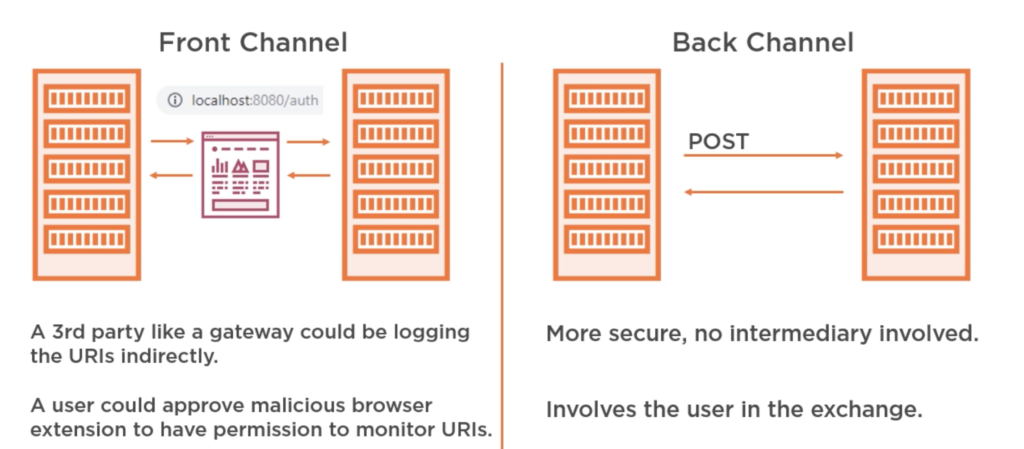
Generally in a server‑side web application, authorization code is acquired by passing through the user’s browser. This is known as a front‑channel request. Once the client received the authorization code, it exchanged it for an access token, this time going via the back channel, directly to the authorization server via a POST request, providing an authorization code along with its clients secret to authenticate itself. Now, this is a problem for public clients, like single‑page applications or your native applications as there is no way to securely store the client’s secret. The code runs in the browser or the mobile device, so anyone can view it. Additionally, for JavaScript applications, until recently, cross‑origin requests were blocked by many browsers. And since the authorization server was on a different domain than the application, it was not always possible to make a back‑channel request. Now to get around this, the implicit flow was created. It removed the authorization code and simply sent the access token via the front channel to the clients. The implicit flow is not as secure as the authorization code flow because the access token is being sent using the redirect via the browser. Basically, it’s using the browser’s address bar. Hence, there are more ways to intercept it than when going directly to the authorization channel via the back channel using a POST request, such as a third party, like a gateway could be logging the URIs indirectly. A user could approve a malicious browser extension to have permission to monitor URIs. Also, if you signed into Chrome, your browser history is synced with Google so they will have your browser history and hence will have your access tokens. Now this is not a concern for the authorization code as it’s useless without the client’s secret, which is why the OAuth working group no longer recommends the implicit flow for public clients, mainly because cross‑origin resource sharing is now universally adopted by most browsers. So the authorization code flow with proof of key exchange is now a viable method and is recommended. Next, let’s look at how the proof of key exchange addresses the shortcomings of the implicit flow.
Authorization Code Flow with PKCE by OAuth2 Clients

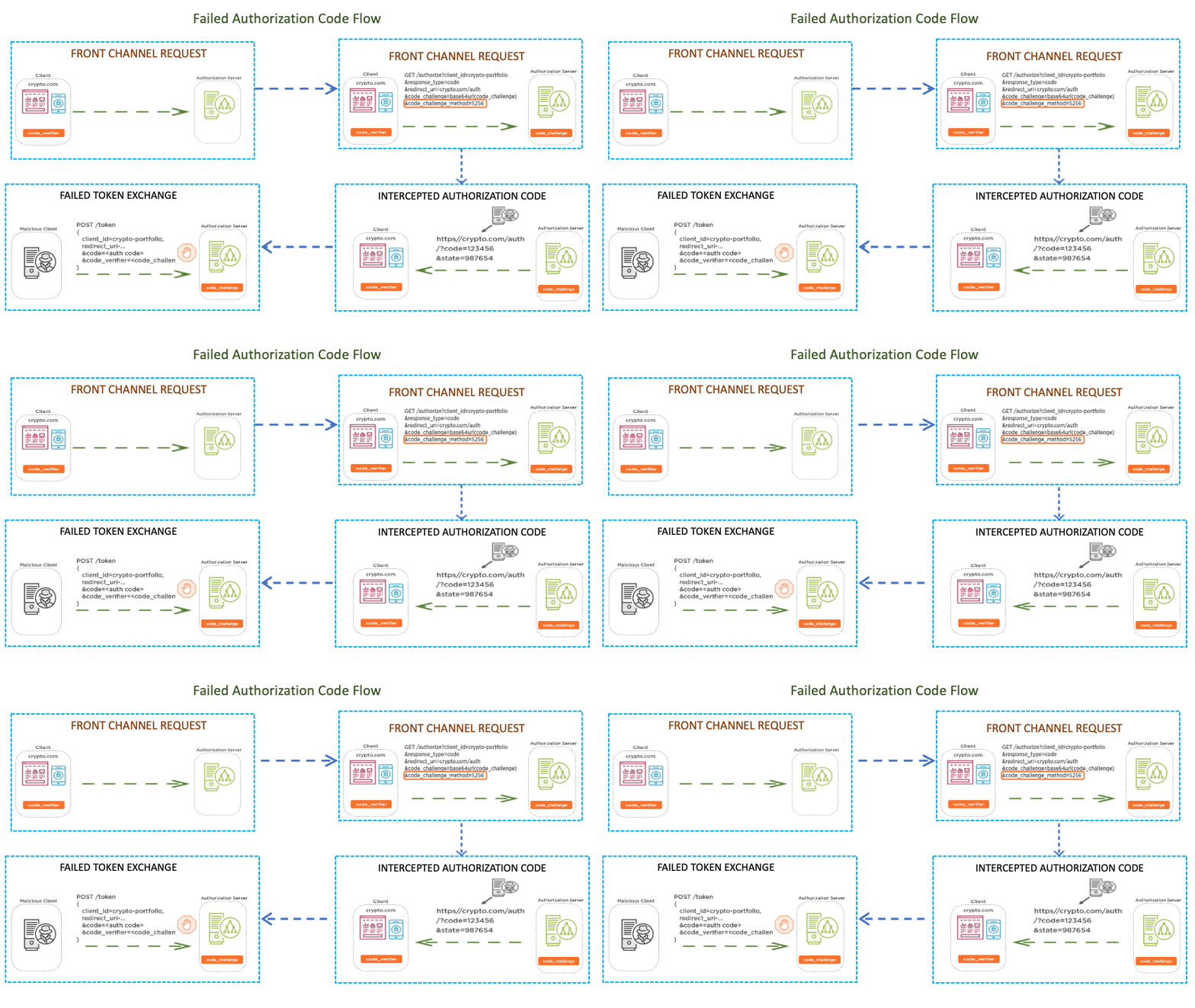
With PKCE, which is short for proof key for code exchange, instead of the public client having a preconfigured client secret, which is then packaged along with all instances of the application, a new secret is dynamically generated for each OAuth 2 authorization flow by the client, which can then be used alongside the authorization code to request an access token via the back channel. Now the way PKCE works is the client generates a random code verifier and stores it in the client’s session. It then hashes the verifier to create a code challenge. The code challenge is then included along with the method in the authorization request. When a client receives the authorization code from the authorization server, it includes the code verifier when making the post back‑channel request to the authorization server. The authorization server would then verify that the code matches. This way, if the authorization code is intercepted, it is useless without the code verifier. And the authorization code can only be exchanged once, so it’s less likely that an attacker would beat the client to it. However, once the public client obtains the access token, there is still the issue of where to securely store it. Let’s look at that in more detail next.
Handling of the Access Token
When it comes to public clients, there is no real secure way to store the access token. For single‑page applications, your options are either in the cookie where your back end needs to run on the same domain and the token is at risk of cross‑site request forgery, local storage where the token will live forever unless the user or application specifically removes it, and session storage, which lives as long as your browser session, basically as long as the tab in your browser is open. Additionally, it’s not shareable between tabs, so it’s slightly more secure than local storage. However, with both local and session, your token is at risk of cross‑site scripting. In our demo application, you can see the token in the session local storage. The user can easily view it. This is another limitation of public clients. With server‑side applications, the tokens are not visible to the user. They are stored within the session. With public clients, they are on the clients. If the user was away from their PC, someone could easily steal their token and copy it to their local storage, effectively masquerading as the user. The user could also take the token and use it directly against the microservices API, potentially exposing any authorization issues in your API by trying to inject values in the request, like trying different usernames and identifiers, etc. Hence, for single‑page applications, it’s advisable to use opaque tokens. If your client needs any user attributes, then use the OpenID Connect ID token or keep the claims returned to a bare minimum. Don’t put any sensitive data on the token. If you need to, then at least encrypt it. Then, use token exchange at the API gateway. This prevents the token from being used directly on any of the microservices in the event your network was breached. If your JavaScript web application is not hosted on a static web server, like Amazon S3, for example, but on a dynamic web server, like perhaps Tomcat, JD, or JBoss, then you can maintain a session between your JavaScript application and the server using cookies. Your server‑side application will handle the OAuth flow. This way, the client secret and access token can be secured on the server. While the server makes all the API calls, the client never sees the access token or the authorization code. It also prevents the need for cross‑origin requests. This is better because cookies can be stored a lot more securely than tokens in a browser as you can prevent them from being accessed by JavaScript.
Understanding Cross-origin Resource Sharing
If your JavaScript single‑page application is handling tokens, then it might have to make a cross‑origin request. A cross‑origin request is any request where the destination is different from the origin. So if our JavaScript originated from crypto.com and made an API call to a different domain, subdomain, port, or protocol, it will be regarded by the browser as a cross‑origin request. Now your single‑page application might need to connect to different API gateways or microservices. If it’s cross‑origin, the browser will block the request from reaching the JavaScript for Git requests or, in the case of PUT and POST, send a preflight request asking the receiving server if it supports the requests from this domain. The server will respond with the appropriate header instructing the browser if the request is valid. This is great. If any malicious JavaScript was to inject itself into your single‑page application from, say, a questionable CND and then tries to make a REST call to your API, it will be regarded as cross‑origin request and blocked by the browser. However, from my experience, CORS is not well understood by developers, and misconfigurations are common. Generally, when a developer sees the CORS error for the first time, they simply Google it and come to the first solution to simply allow all CORS requests. However, this opens up your API to cross‑domain requests from malicious JavaScript. Hence, it’s better to be specific with the domain you allow cross‑origin requests, protecting your API from malicious scripts, or ideally, always have your SPA connect to an API gateway or back end for front end running on the same domain and perform and cross‑origin request server side.
Conclusion
The main takeaways from this page is that, as the microservices developer, you’re likely going to have to understand security front to back, and this was just a primer to front‑end security. A token received from a server‑side web application is not the same as one received from a single‑page application or native client, even if the contents are the same as there are more ways for the token to be compromised in public clients. Ideally, single‑page applications should not be exposed to access tokens. If they are, then the tokens should be opaque or, at the very least, should not contain any sensitive data on them unless it’s encrypted. Keep the token expiration to a minimum to reduce the impact of any breaches. The implicit flow is no longer recommended by the OAuth working group as there are now no more limitations, which would prevent you from using OAuth 2 authorization code with PKCE. Always use HTTPS, no excuses now that it’s free with Let’s Encrypt. Set robust content security policies and don’t use any questionable CDNs..